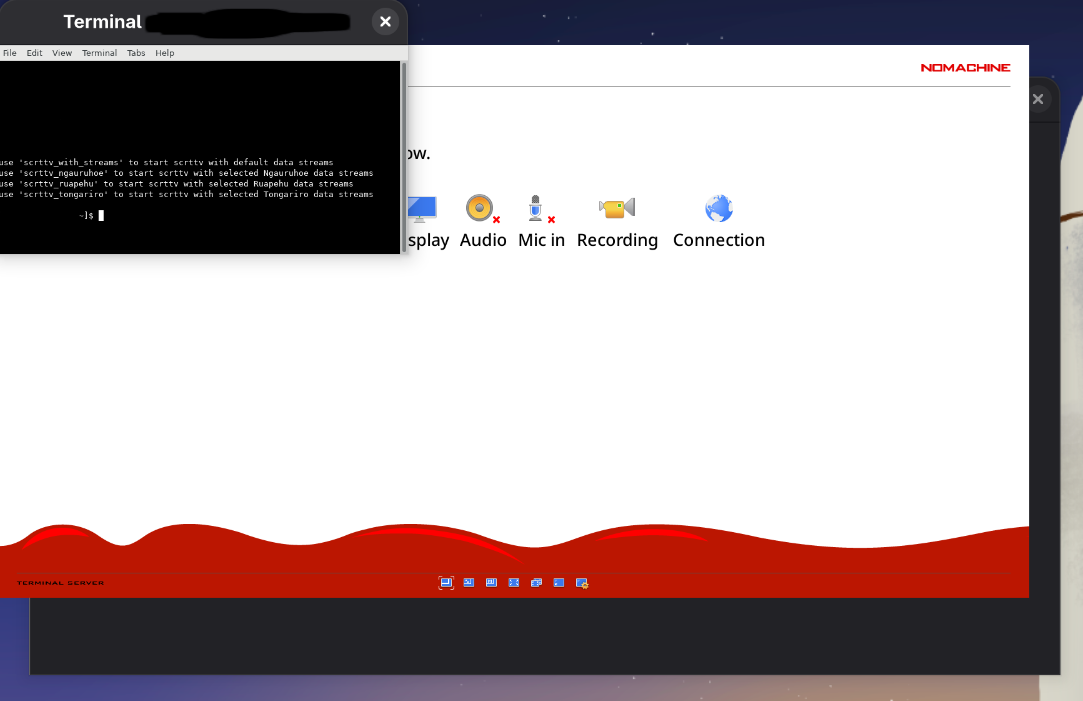
Our users have noticed that running NoMachine Enterprise Client 9.x on Fedora 43 that the application and connections to remote servers is only displaying with very small font sizes, which makes it very hard for users to read.
This was not previously a problem, on Fedora 42 the Enterprise Client works as expected. Normal font sizes.
Changing the font size under “Appearance” settings will increase the font size locally only. It doesn’t carry through to the remote sessions opened on servers. Both the desktop and the floating terminal both suffer the same display down-scaling problem.
Is there anything that can be done to fix this?
Locally installed NoMachine package with sudo rpm -i --nodigest ./nomachine-enterprise-client_9.2.18_3_x86_64.rpm
The only unusual message in the install.log file is this:
NX> 700 Skipping setting an executable stack flag for binaries. Command not found: execstack.
Everything else installs with Result: OK.
When connected to a RHEL8 remote server, everything is running with SW encoding. Trying to change the appearance causes the terminal application window to go crazy, and has to be closed.
We just want NoMachine to go back to the previous behaviour (after the blurred text was fixed in previous release).


 .
.