Forum Replies Created
-
AuthorPosts
-
 BritgirlKeymaster
On Windows the EC package can install without requiring admin rights. A portable version is in the works.
BritgirlKeymasterWe’re not aware of any slowness on client side. What you can do is this:
– Launch Activity Monitor
– While the client is slow to update, do you see a NoMachine process with high %CPU values? What is the spike value?
– Select the NoMachine process with higher %CPU, and in the top Activity Monitor menu click the down arrow and select “Sample Process” in the popup
– Click “Save…” in the opening window to store the file. Zip up and send it to us by attaching here or directly to forum[at]nomachine[dot]com.BritgirlKeymasterHi,
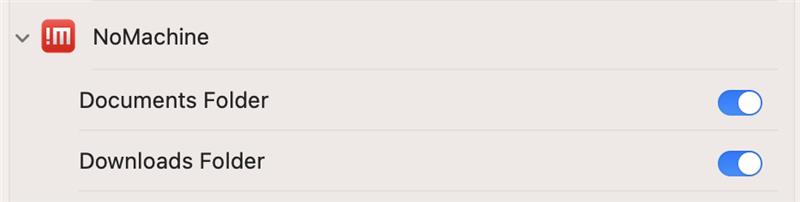
nothing has changed in how connections (nxs files) and local machines (broadcast on the same LAN) are shown. Firstly, check whether NoMachine has access to the Documents folder. You can do that by going to “Files and Folders” on your macOS client (in Security Preferences). See the attached.
Attachments:
BritgirlKeymasterTry with
sudo systemctl set-default multi-user.targetBritgirlKeymasterIt looks like you have “start the server at system startup” disabled. Did you install NoMachine from the AUR repository? If so, take a look at my answer to this topic dealing with the same problem: https://forum.nomachine.com/topic/nxd-does-not-start-from-systemd-but-does-from-nxserver-restart-2#post-46344.
February 27, 2025 at 09:35 in reply to: Black Screen: iOS !NM 8.7.1 connecting to MacOS !NM 8.16.1_2 #51950BritgirlKeymasterYes we did, sorry for not coming back to you to confirm. Developers have prepared a debug package for you, it contains a potential fix. Can we send you a link to download with further instructions?
BritgirlKeymasterJessie, no worries, we were able to download the logs.
February 25, 2025 at 11:43 in reply to: Weird issue with flatpak, Mint 21.3, virtual framebuffer #51924BritgirlKeymasterIt looks like flatpak applications don’t work correctly on virtual display sessions. We are not able to reproduce all the problems. In our tests apps are listed, but it could be related to your desktop environment. We tested with Cinnamon. Apps can be started, but indeed it asks for auth many times during installation.
But the same problem occurs when installing even through SSH remote connections. There is even a bug report: https://github.com/flatpak/flatpak/issues/3001. So it’s not NoMachine related.
The workaround is to edit policy file:
/var/lib/polkit-1/localauthority/10-vendor.d/org.freedesktop.Flatpak.pklaand add there
ResultAny=yes to section with: org.freedesktop.Flatpak.modify-reposo the file should look like this:
$ sudo cat /var/lib/polkit-1/localauthority/10-vendor.d/org.freedesktop.Flatpak.pkla [Install Flatpak apps and runtimes] Identity=unix-group:sudo Action=org.freedesktop.Flatpak.app-install;org.freedesktop.Flatpak.runtime-install;org.freedesktop.Flatpak.app-uninstall;org.freedesktop.Flatpak.runtime-uninstall;org.freedesktop.Flatpak.modify-repo; ResultActive=yes ResultAny=yes [Override parental controls for Flatpak apps] Identity=unix-user:* Action=org.freedesktop.Flatpak.override-parental-controls ResultAny=auth_admin ResultActive=auth_admin ResultInactive=auth_adminBritgirlKeymasterThanks, we were able to download them (please ignore my previous message :-))
BritgirlKeymasterPlease give us some more details about the server machine. The article you mention is for headless servers where you are running the free edition software.
What NoMachine product is installed on the server side? You mention other users can connect fine – is this to the same server, so can we assume it is a Terminal Server?
What desktop environment are you trying to connect to? What Linux distribution and version is it?
Restarting the NoMachine server would terminate the sessions of the other users, so this is not recommended. If you are not the administrator of the machine, please contact who is and ask them to open a support ticket. We will need to see logs from the server host which can be gathered by using the instructions here: https://kb.nomachine.com/DT07S00243
Send them to forum[at]nomachine[dot]com. Please use the title of this topic as the subject of your email. Thanks!
BritgirlKeymasterOk we’ll wait for the server-side output 🙂
BritgirlKeymasterThanks for the logs, we will come back to you once they have been analyzed.
BritgirlKeymasterHi, in the logs we see a number of different errors, both Wayland and X11 sessions fail. But first let’s investigate Wayland.
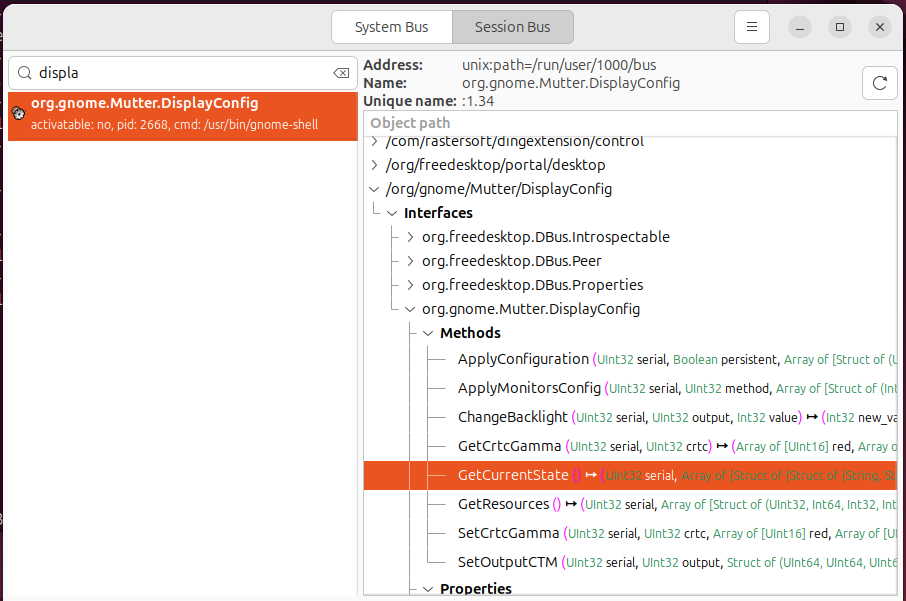
Can you show us the output of the following dbus method call ‘GetCurrentState’ to check if the monitor configuration looks correct? To do that you need to install the d-feet application and run the method as highlighted in the screenshot (below) by double clicking it.
Also, try connecting when the server machine’s screen is not locked. Do you still get the white screen?
Attachments:
February 18, 2025 at 19:03 in reply to: ED25519 and ECDSA for NX protocol produce “Authentication Failed” error #51865BritgirlKeymasterThanks for the report. We’ll get it checked out to make sure it’s updated if necessary.
February 18, 2025 at 18:19 in reply to: Black Screen: iOS !NM 8.7.1 connecting to MacOS !NM 8.16.1_2 #51863BritgirlKeymasterHi Brian, did you send us the logs?
-
AuthorPosts