

Forum / NoMachine for Windows / Keyboard and NoMachine icons on the panel not visible
- This topic has 8 replies, 2 voices, and was last updated 3 months, 1 week ago by
 pdb.
pdb.
-
AuthorPosts
-
March 31, 2026 at 11:13 #55790pdbParticipant
Am using Windows client 9.4.14 with Linux (virtual desktop) server. Mate desktop.
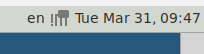
In the client, the keyboard and NoMachine icons on the panel are not visible usually. I can make them visible by making some changes to the Panel properties. They then look like this:
But as soon as I click for example on a menu (like Applications or System), the icons disappear again and it looks like this:
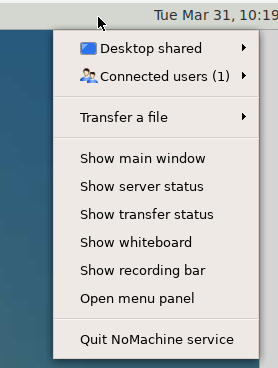
Even when the icons are not visible, I am able to click on them (when I guess the location correctly). So I can switch the keyboard language (am using English and German keyboards), and I can get the NoMachine menu:
How to make the icons visible all the time? I have played around with different themes, but without success.
March 31, 2026 at 11:17 #55794BritgirlKeymasterPlease attach the screenshots using the upload tool, thanks. What’s the distribution and version?
March 31, 2026 at 12:18 #55795pdbParticipantServer is on RHEL8.
Attachments:
April 1, 2026 at 14:56 #55807BritgirlKeymasterThis looks like a desktop issue, caused by the fact that the drawer showing 3rd party application icons has been removed? Please follow the instructions here:
What to do when the !M icon is not present in the system tray of GNOME desktop
https://kb.nomachine.com/AR09U01205April 1, 2026 at 15:12 #55809pdbParticipantI am using Mate, and that article says: “As an alternative, you could choose to adopt a lightweight desktop which doesn’t exhibit this behaviour, for example MATE or Xfce. “…
April 2, 2026 at 12:50 #55821BritgirlKeymasterCan you send us the client-side logs to start with? Connect to the problematic desktop, open the NoMachine connection menu (Ctrl-Alt-0) > Connection Info > Take logs. Send us that file, please. You can attach it here or send direct to forum[at]nomachine[dot]com. So far we have been unable to reproduce this issue in our own test environment.
April 2, 2026 at 12:53 #55822pdbParticipantFile attached.
Attachments:
April 3, 2026 at 12:24 #55838BritgirlKeymasterHi, we’re able to reproduce the same behaviour when the Mate panel is version 1.26.4 on Redhat/Rocky and only with virtual desktop session (connecting to a NoMachine terminal server) With other version of Mate we are not able to reproduce it, so it seems to be a Mate issue. Btw, if you’re a subscriber of Terminal Server, you are entitled to open a support enquiry directly from your User Area 😉
April 7, 2026 at 08:20 #55844pdbParticipantThanks, will try a different Mate version.
-
AuthorPosts

You must be logged in to reply to this topic. Please login here.