Forum Replies Created
-
AuthorPosts
-
 BritgirlKeymaster
The logs don’t indicate any issue with NoMachine software. Rather there are multiple reconnects which would indicate problems with your network. Statistics show high latency which also indicates network issues. We can see “268 ms latency 5s, 221 ms latency 30s”.
For 5 seconds there was an average of 268 ms latency and for 30 seconds there was an average of 221 ms latency, so you should looking in to your network conditions. It might not even neccessarily be a bandwidth problem, but maybe some other bottlenecks like router, switch, or network card even. Maybe you could do a ping and traceroute and monitor them when you’re reproducing the problem.
BritgirlKeymasterYou need to forward port 4000 to the local IP of the first Mac and 4001 to the second Mac’s local IP 🙂
November 30, 2022 at 18:49 in reply to: Connect to NoMachine Small Business Server on 2 out of 3 monitors #41762BritgirlKeymasterThis is not currently possible, but is planned for a future release.
In the current version, when the user has multiple monitors on the client, it is possible to choose if the NoMachine virtual Linux desktop session has to be spanned on all monitors so that the virtual desktop sees this as one giant monitor, or if each monitor can be treated as an individual monitor. The difference is in the first case when you for example maximize a window, it spans on all monitors. In the second case separate monitors let you drag windows between monitors. Maximized applications only span one monitor.
November 30, 2022 at 15:22 in reply to: Problematic keys when connecting from Mac to KDE on CentOS #41761BritgirlKeymasterWe haven’t been able to reproduce this behaviour, so we ask users who were encountering this issue to update to the latest 8 and open a new topic if the problem is still there, so that we can start a new investigation. This topic is going to be closed.
November 30, 2022 at 12:38 in reply to: NoMachine 8.1.2 shows blank desktop when connecting to Macbook M1 Pro 14-inch (macOS12.6) #42230BritgirlKeymasterSeems like a permissions issue on the Mac machine. This TR was fixed in the 8.1.2 release, but it requires that you set the accessibility permissions correctly, after which it will no longer be necessary.
Cannot connect to physical desktop on macOS after a system update
https://www.nomachine.com/TR10S10377November 30, 2022 at 12:20 in reply to: Connecting to Windows very slow without remote monitor on #42228BritgirlKeymasterYou could try attaching a dongle if you don’t want the monitor on, so essentially making it a headless Windows machine.
How to solve black screen problem on Windows headless machines
https://kb.nomachine.com/AR05S01124BritgirlKeymasterWe recently discovered a similar issue but only when using Linux Mint in a VM. Please edit /usr/NX/etc/node.cfg and set following key:
DisplayServerExtraOptions "-eventdelay 0"and restart nxserver:
sudo /etc/NX/nxserver --restartDoes it help?
November 30, 2022 at 10:26 in reply to: Can’t connect reliably from Windows to headless Linux #41754BritgirlKeymasterZatoichi, thanks for contributing to the thread. As I reported in an earlier reply, our investigations showed a similar issue which we saw on version 7 which was related to how X server “goes offscreen”, not caused by the NoMachine software itself. In all of these cases, the server side was running Linux and X.org was crashing. See the original thread here:
To check what’s happening in your set-ups, and if it’s indeed the same as others have reported, we would need the same information that I asked before. Choose one of the distributions to use where you know you can reproduce the issue. I would suggest we start a new thread at this point, so when you do submit them, I will split this to a new topic and add the details of the environment, including distro version and desktop environment.
1) NoMachine server side logs (see the document here for complete instructions, https://kb.nomachine.com/DT07S00243)
2) the file /etc/X11/Xorg.0.log.old if its present
3) output of
'sudo journalctl -b'4) any core files after debugging with https://kb.nomachine.com/AR09L00810
You can send all this information directly to forum[at]nomachine[dot]com. Please use the title of this title of this topic as the subject of your email.
Thanks!
Thanks.
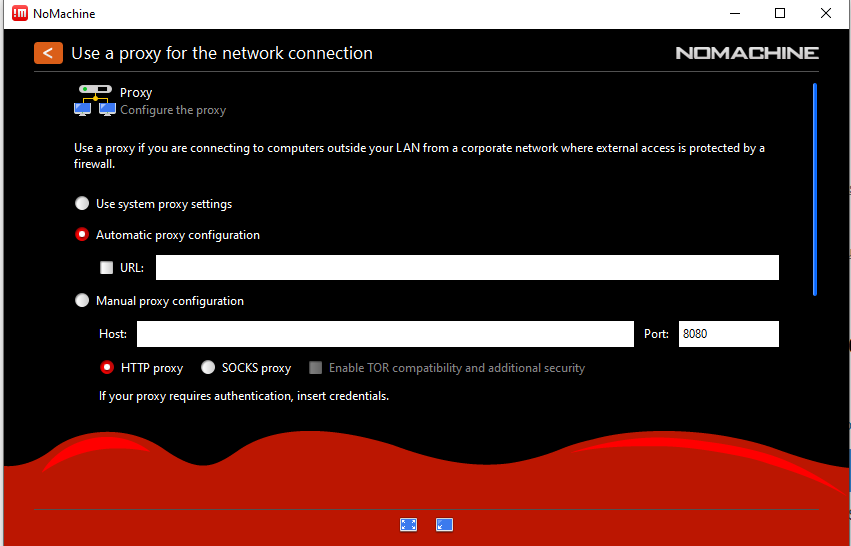
November 29, 2022 at 17:42 in reply to: Ooops! Could not initialize the connection, please verify your proxy settings. #42194BritgirlKeymasterThe proxy is a NoMachine setting that you enable on the Player side (the machine you connect from), not the server side. You are enabling “Manual proxy configuration” but the message shows that “Failed getting proxy settings” which suggests there is nothing configured in the panel (see attached).
Please show us what you have configured on the Player (open !M on the player, go to settings, select Player, select Security, enable Proxy and then select your preference. You must indicate to NoMachine the details of your proxy server here.)
Attachments:
BritgirlKeymasterAh re-reading I now understand what you were asking. Sorry for the mix-up 🙂 There is no x server running at all on the system you are connecting from, so you are not running XWayland. If this is the case, you are right, the message is not very clear and we decided to change it to something like this:
The NoMachine Player cannot connect to X server
This can be because no X server is running or you didn’t set the DISPLAY environment.
Or it can be because you are running this desktop on Wayland.
The NoMachine Player doesn’t support the Wayland environment without X.
Be sure you run XWayland instead.We’re working on supporting Wayland, natively without XWayland, but it’s not a priority at the moment, so don’t expect this very soon.
November 28, 2022 at 18:06 in reply to: Sticky functions keys when using DisplayServerExtraOptions #41703BritgirlKeymasterThe Fn key being stuck is a system bug that was fixed when we moved to the latest macOS API. For the old API it cannot be fixed unfortunately.
BritgirlKeymasterNoMachine supports desktops running on Wayland. It installs out-of-the-box just like it does on X.org.
Make sure you always include the “What to include” list that we provide when you are submitting a topic or reply 🙂 What did you install on the server side? I.e the computer you want to connect to. NoMachine Free Edition or maybe NoMachine Workstation?
NoMachine needs a desktop environment running on the machine you want to install it one. What DE are you using? What Linux distro is it, and what version?
BritgirlKeymasterHi thanks for those. After analysis of the logs, it seems no connection is occurring. At this point we need to look at the player side logs. So you should tick the box “Don’t delete log files on exit” in the Player settings (Security), reproduce and then share the .nx folder with us. Thanks!
BritgirlKeymasterHi, Ventura is supported and installs out-of-the-box with default settings exactly the same as other macOS versions 😉
Can’t connect.
To understand why you can’t connect, it would help if knew the error that you are seeing. Can you show us the screenshot of the error that is showing? Or copy and paste the error here.
November 28, 2022 at 10:07 in reply to: Need Mac keymapping for NoMachine (runnning ubuntu 20.04 on server side) #41681BritgirlKeymasterOur current design supports keys 1:1, so if you want Control on the server-side, you have to press Control on the client as well. We’re currently evaluating ways to customize key bindings by mapping some pre-defined system shortcuts (like Command + C on Mac and Control + C on Windows).
-
AuthorPosts