Forum Replies Created
-
AuthorPosts
-
 BritgirlKeymaster
Hi, it could be related to permissions. Can you check in Accessibility, Screen Recording and Full Disk Access that NoMachine and nxnode (a component of NoMachine) have been correctly added in the Privacy panel? Remove and add again if necessary. This article shows the panels to check: https://kb.nomachine.com/AR11Q01061
BritgirlKeymasterSorry for the delay in responding. We weren’t able to reproduce the problem but it looks like uninstall scripts didn’t run properly.
In which way did you uninstall NoMachine:
1) moved NoMachine.app to trash bin,
2) removed /Applications/NoMachine.app dir from terminal,
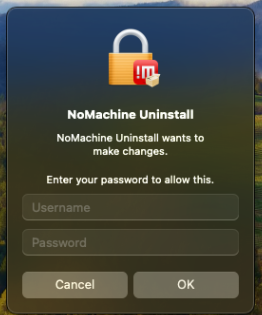
3) removed /Applications/NoMachine.app dir from SSH session?Did you see message boxes requesting password and administrative
privileges for NoMachine Uninstall?https://forum.nomachine.com/wp-content/uploads/2024/02/PasswordNoMachineUninstall.png
https://forum.nomachine.com/wp-content/uploads/2024/02/AllowNoMachineUninstall.pngDo you still have /Library/Application Support/NoMachine/var/log. If
yes, could you pack the dir and send to forum[at]nomachine[dot]com?Could you send also output from commands:
which bashls -l /bin/bashid nxBritgirlKeymasterHi, can you enable debug and gather logs from the Windows machine? You can extract them using the instructions here: https://kb.nomachine.com/DT07S00243. Enable debug, connect from Mac to the Windows server to reproduce the problem and then extract the logs.
Attach them here or send them to forum[at]nomachine[dot]com. Please use the title of this topic as the subject of your email. Thanks!
October 7, 2024 at 16:24 in reply to: Unable to connect after automatic update prompt raised while screen locked #50029BritgirlKeymastershould NoMachine even be able to connect through a VPN on the router where the IP is on a separate subnet while the mac is in standby
NoMachine’s WOL won’t be effective in that case.
So we can close the topic. I only suggested to gather logs if the problem of not being able to connect persisted. But this seems to be solved 🙂
October 7, 2024 at 15:56 in reply to: Key based authentication for web connections with NX protocol #50027BritgirlKeymasterIt could be that you are encountering this known issue:
Cannot use 4096 bit RSA keys for key-based authentication in web sessions
https://kb.nomachine.com/TR08Q09394Please try the available workaround.
BritgirlKeymasterHi, can you tell us what Windows OS version it is? Did you try clicking “update driver” in the Windows dialog (left of image)? Are you using a USB hub maybe?
In the meantime you could trying disabling the NoMachine drivers and see if that helps.
How to disable or uninstall NoMachine USB drivers on Windows
https://kb.nomachine.com/AR12O00955BritgirlKeymasterHi, what deb distribution are you running, Cinnamon or XFCE? We’ve heavily tested both and don’t have any issues. A “wrong deb package” such as 32-bit instead of 64-bit or vice-versa would still open.
Can you try starting player from the command line ( /usr/NX/bin/nxplayer)? What is the output?
It would also be useful to check the NoMachine logs and even the system logs of the affected installation.
BritgirlKeymasterHi, it’s not clear to us what you tried doing. Can you send us the NoMachine logs of both the Windows (client) and the Sonoma (server) machines? You can extract them using the instructions here: https://kb.nomachine.com/DT07S00243. There are 4 steps to follow. The fourth step is for the device you are connecting from.
Attach them here or send them to forum[at]nomachine[dot]com. Please use the title of this topic as the subject of your email. Thanks!
October 4, 2024 at 17:55 in reply to: Unable to connect after automatic update prompt raised while screen locked #49973BritgirlKeymasterIn any case, perhaps the separate network timeout when in standby is something that should have been reported and investigated before now.
We’ve not seen any issues with 1) the automatic software update dialog blocking remote access for NoMachine and 2) nor interfering with other applications in our tests. No other users have reported similar issues.
Please confirm: are you able to connect with NoMachine now? Are you also able to connect with NoMachine when the Mac has gone to sleep? Next time, if you have problems when connecting with NoMachine, the best thing to do is to zip up the entire .nx home directory on the Mac server and send it over, and we can take a look. If you encounter a problem which is reproducible, then in that case, enable debug first, reproduce the problem and send us the logs. The steps to reproduce the problem would also be useful to us. Here is the link to the instructions in case you need them next time: https://kb.nomachine.com/DT07S00243.
BritgirlKeymasterThe Windows OS version e.g is it Windows 11?
BritgirlKeymasterCRCinAU,
sorry for the confusion. I realise now that you fixed the issue for which you opened this topic by changing some configuration keys (https://forum.nomachine.com/topic/fedora-40-nomachine-not-working#post-48741). My bad.
Just to clarify what we had written about another issue you mentioned, related to resolution/resize, there is no change. This is what we wrote last time about Wayland after looking at your logs, “NoMachine handles the resize correctly but then the desktop fails to adapt. You mentioned that you have this problem with startplasma-wayland, but not with startplasma-x11. Even when running the Wayland command, the virtual desktop will fall back to using X11 in any case, because that is the only protocol that NoMachine virtual desktops support at the moment. So the recommended command is startplasma-x11.”
BritgirlKeymasterI have split your issue to create a new topic as it looks to be a totally different problem. (old topic is https://forum.nomachine.com/topic/after-upgrade-to-ubuntu-24-04-1-lts-players-immediately-disconnects/page/2).
Can you look for core files of the nxplayer and submit the backtrace?
BritgirlKeymasterHi, in my last post I suggested to try monitoring the system calls when the player starts. I’ll paste my old reply here for convenience…
We don’t see much difference in the processes besides the Memory Integrity being enabled only on the troublesome system. We can only assume that the differences must lie in the way the two machines are configured. Maybe monitoring to know what happens in system calls could be useful when the player starts?
i) Download Process Monitor https://docs.microsoft.com/en-us/sysinternals/downloads/procmon (it doesn’t require installation)
ii) Right-click on Procmon.exe and select “Run as administrator”
iii) Click on “Filter” in the top menu, then “Filter…”, click “Add” and set the filter:
* Column: Process Name
* Relation: is
* Value: nxplayer.bin
iv) Click “Add” then “Apply”.
v) Click on “File” then “Clear”
vi) Start the NoMachine client, and let Process Monitor capture data for about 30 seconds
vii) Click the magnifying glass icon in the toolbar to stop capturing
viii) Click “File” in the top menu, then “Save…” (PML file)
ix) Create also a TXT summary. Click “File” > “Export…” > “Text File”BritgirlKeymasterTrnqullea, can you enable debug, reproduce the problem and submit the logs so we can check? If needed, I can spin off your thread if it’s a different problem.
BritgirlKeymasterChatter5352, just to clarify, we don’t need to send you a debug package for the SSH issue because you we now know that you are using the free version which doesn’t support incoming SSH connections. If you are still experiencing the session freezes, we would be interested in seeing the server side logs (see Guro’s post just above). Let us know.
-
AuthorPosts